

Your Success, Our Mission!
6000+ Careers Transformed.
Explanation
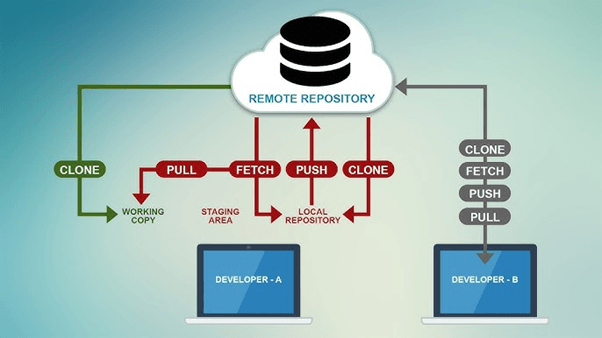
Git is a distributed version control system that tracks changes to files over time and enables multiple developers to collaborate efficiently. Its architecture is based on local repositories that contain the complete project history, allowing developers to work offline and merge changes later. Git operates through snapshots rather than file diffs, making operations fast and reliable. Core concepts include commits (snapshots of changes), branches (parallel lines of development), merges (combining changes), and remotes (shared repositories). A standard workflow promotes small, frequent commits, feature branching, and controlled merges to maintain code quality.
| Git Concept | Purpose |
|---|---|
| Repository | Project history store |
| Commit | Snapshot of changes |
| Branch | Parallel development |
| Merge | Combine changes |
| Remote | Shared repository |
Example
A developer creates a feature branch to add a new API endpoint. Changes are committed incrementally with meaningful messages. Once complete, a pull request is opened for review. After approval, the branch is merged into the main branch. The full history remains traceable. If issues arise, the team can revert to a previous commit quickly.
Use Cases
• Collaborative software development
• Change tracking and rollback
• Parallel feature development
• Auditability of code changes
Explanation
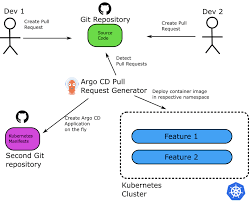
Repository hosting platforms provide centralized locations to store Git repositories and add collaboration, automation, and governance features. These platforms enable pull requests or merge requests, code reviews, issue tracking, and CI/CD integration. Access control mechanisms manage permissions for individuals and teams. Webhooks and APIs allow automation with external systems. By hosting repositories centrally, teams improve visibility, enforce standards, and integrate development workflows with automated pipelines.
Table
| Feature | Function |
|---|---|
| Pull/Merge Requests | Code review workflow |
| Issues | Task and bug tracking |
| Webhooks | Event-driven automation |
| CI Integration | Automated pipelines |
| Access Control | Permission management |
Example
A team hosts its code on a shared repository platform. Developers open merge requests for every change, triggering automated tests. Review comments are added inline, and approvals are required before merging. Issues are linked to commits for traceability. CI pipelines run automatically on each update. The workflow ensures quality and accountability.
Use Cases
• Team collaboration and code review
• CI/CD pipeline integration
• Project and issue management
• Secure repository hosting
Top Tutorials
Related Articles

 in Bengaluru, India


All Courses (6)
Master's Degree (2)
Fellowship (2)
Certifications (2)


 Git Fundamentals


 in Bengaluru, India