

Your Success, Our Mission!
6000+ Careers Transformed.
Explanation
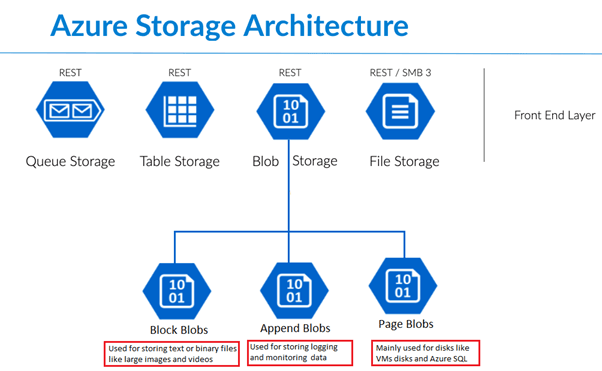
Azure Blob Storage is designed for storing massive amounts of unstructured data such as images, videos, documents, logs, and backups. It follows an object storage architecture where data is stored as blobs within containers, allowing virtually unlimited scalability. Blob Storage supports multiple access tiers—hot, cool, and archive—optimized for different usage patterns and cost efficiencies. Data is automatically replicated within a region and optionally across regions to ensure durability and high availability. Security features such as encryption at rest, access keys, shared access signatures, and role-based access control protect stored data.
Table
| Access Tier | Use Case | Cost |
|---|---|---|
| Hot | Frequently accessed data | Higher storage cost |
| Cool | Infrequently accessed data | Lower storage cost |
| Archive | Long-term storage and rarely accessed data | Lowest storage cost |
Image Placeholder
Example
A media company stores high-resolution images and videos in Azure Blob Storage. Recently uploaded content is placed in the hot tier for fast access. Older content is automatically moved to the cool tier using lifecycle policies. Archived media that is rarely accessed is stored in the archive tier to minimize costs. Data remains secure and durable with built-in replication. The company reduces storage expenses while maintaining accessibility.
Use Cases
• Media content storage
• Backup and disaster recovery
• Log and telemetry data storage
• Static website hosting
Explanation
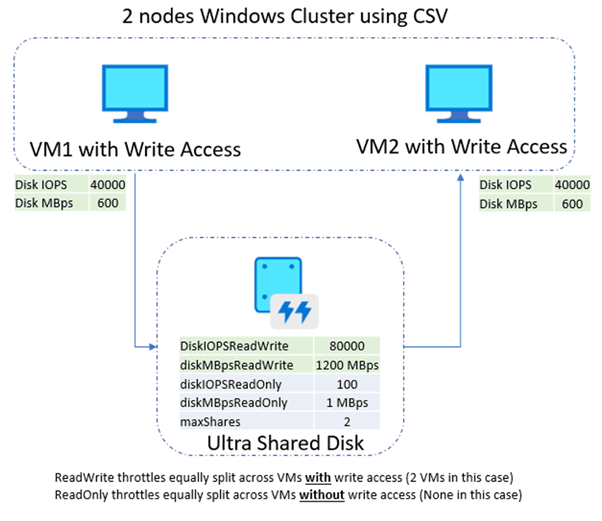
Azure Managed Disks provide block-level storage for virtual machines, abstracting the complexity of storage account management. They ensure high performance, scalability, and built-in redundancy. Managed disks are available in multiple performance tiers, supporting both HDD and SSD options. Azure File Shares offer fully managed file shares accessible over standard file protocols, enabling shared storage across multiple systems. These services simplify storage management while supporting enterprise-grade performance and availability.
Table
| Storage Type | Purpose |
|---|---|
| OS Disk | Virtual machine boot volume |
| Data Disk | Stores application and persistent data |
| File Share | Provides shared file access across systems |
| SSD Disk | Supports high-performance and low-latency workloads |
Image Placeholder
Example
An enterprise application runs on multiple virtual machines that require shared access to configuration files. Azure File Shares provide centralized storage accessible by all VMs. Managed disks are attached to each VM for application-specific data. SSD disks ensure low-latency performance. Storage redundancy protects data from hardware failures. The setup simplifies management while maintaining performance.
Use Cases
• Virtual machine persistent storage
• Shared file systems
• Enterprise application data
• High-performance transactional workloads
Top Tutorials
Related Articles

 in Bengaluru, India


All Courses (6)
Master's Degree (2)
Fellowship (2)
Certifications (2)


 Azure Blob Storage


 in Bengaluru, India