

Your Success, Our Mission!
6000+ Careers Transformed.
Explanation
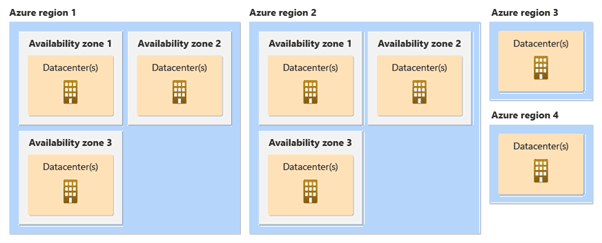
Azure’s global infrastructure is organized into regions, availability zones, and geographies to provide scalability, fault tolerance, and regulatory compliance. A region represents a geographical area that contains multiple data centers connected by low-latency networks. Availability zones within a region are physically isolated data centers with independent power, cooling, and networking, designed to prevent single points of failure. Geographies group regions within a specific political boundary, enabling organizations to meet data residency and compliance requirements. Azure also pairs regions within the same geography, ensuring disaster recovery support during large-scale outages.
Table
| Term | Definition | Purpose |
|---|---|---|
| Region | Geographic location where Azure data centers are deployed | Low latency access |
| Availability Zone | Physically separate data center within a region | Fault tolerance |
| Geography | Discrete market boundary containing multiple regions | Legal and compliance requirements |
| Region Pair | Two linked Azure regions within the same geography | Disaster recovery and high availability |
Image Placeholder
Example
A global SaaS application deploys its services in multiple availability zones within a single region to ensure high availability. If one data center fails, traffic automatically routes to another zone without service interruption. To protect against regional disasters, backups are replicated to the paired region. This setup ensures business continuity, regulatory compliance, and consistent user experience. The company avoids downtime even during infrastructure failures.
Use Cases
• High-availability enterprise applications
• Disaster recovery and business continuity planning
• Low-latency global deployments
• Regulatory-compliant data hosting
Explanation
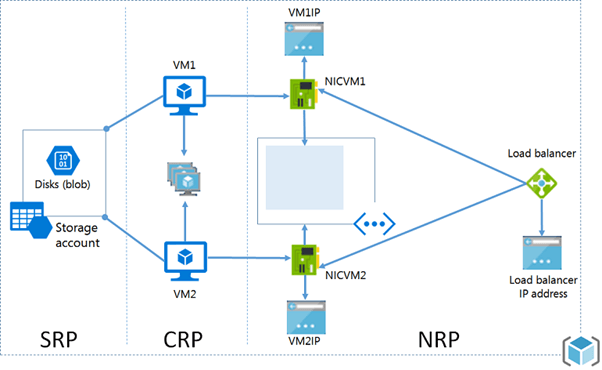
Azure Resource Manager is the deployment and management layer that allows users to create, update, and delete Azure resources in a consistent and repeatable manner. ARM enables infrastructure to be defined as code, ensuring predictable deployments and reducing configuration errors. It organizes resources into resource groups, which act as logical containers for lifecycle management. ARM enforces role-based access control, policies, and tags, enabling governance, security, and cost tracking at scale.
Table
| Component | Role |
|---|---|
| Resource Group | Logical container for managing related Azure resources |
| Azure Resource Manager (ARM Template) | Infrastructure definition and declarative deployment model |
| RBAC (Role-Based Access Control) | Access control and permission management |
| Tags | Cost management and resource tracking |
Image Placeholder
Example
A DevOps team deploys multiple environments using ARM templates. Each environment uses identical configurations, ensuring consistency. Role-based access control restricts permissions based on job roles. Tags are applied to track costs per department. Updates are made safely without impacting unrelated resources. This approach reduces manual errors and simplifies large-scale management.
Use Cases
• Infrastructure as Code (IaC) deployments
• Governance and access control
• Cost management and tagging strategies
• Automated environment provisioning
Top Tutorials
Related Articles

 in Bengaluru, India


All Courses (6)
Master's Degree (2)
Fellowship (2)
Certifications (2)


 Azure Regions and Availability


 in Bengaluru, India