

Your Success, Our Mission!
6000+ Careers Transformed.
Explanation
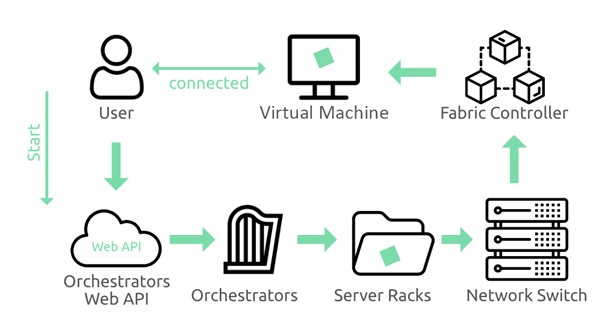
Azure Virtual Machines (VMs) provide on-demand, scalable computing resources that allow users to run operating systems and applications in the cloud. The VM architecture is built on hypervisor-based virtualization, enabling multiple isolated virtual machines to run on shared physical hardware. Each VM consists of compute (CPU), memory (RAM), storage (managed disks), and networking components (virtual network interfaces). Azure abstracts hardware management, while users control the operating system, runtime, and applications. VM availability is enhanced through availability sets, availability zones, and scale sets, which distribute instances to prevent single points of failure and support horizontal scaling.
Table
| Component | Description |
|---|---|
| VM Size | CPU and memory configuration of a virtual machine |
| OS Disk | Boot disk that contains the operating system |
| Data Disk | Additional storage attached to the virtual machine |
| NIC (Network Interface Card) | Enables network connectivity for the virtual machine |
| Availability Set | Provides fault and update domain isolation for high availability |
Image Placeholder
Example
A company migrates an on-premises application to Azure using virtual machines. The application requires full OS control, so a VM is provisioned with a custom Linux image. Managed disks are attached for data storage, and the VM is placed in an availability set for redundancy. As traffic increases, additional VMs are deployed to handle the load. Maintenance updates occur without downtime due to update domain separation.
Use Cases
• Lift-and-shift migration of legacy applications
• Custom software requiring OS-level access
• Development and testing environments
• Workloads with predictable resource needs
Explanation
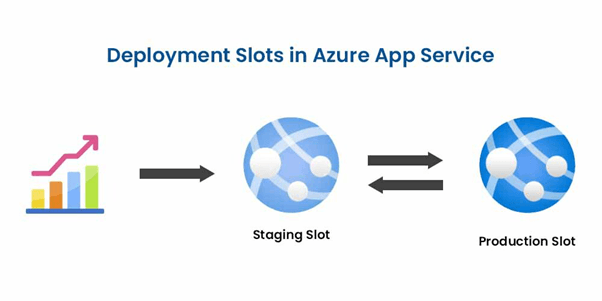
Azure App Services is a fully managed platform for building, deploying, and scaling web applications and APIs without managing servers. It abstracts infrastructure concerns such as patching, load balancing, and scaling, allowing developers to focus solely on application code. App Services supports multiple programming languages and frameworks and integrates with DevOps pipelines for continuous deployment. Built-in autoscaling dynamically adjusts resources based on traffic, while deployment slots enable zero-downtime releases by swapping environments seamlessly.
Table
| Feature | Function |
|---|---|
| App Service Plan | Defines compute resources for hosting applications |
| Autoscaling | Dynamically adjusts resources based on demand |
| Deployment Slots | Enables safe releases and zero-downtime deployments |
| Managed Runtime | Eliminates OS maintenance by abstracting infrastructure management |
Image Placeholder
Example
A startup builds a REST API using Azure App Services. Developers deploy code directly from a Git repository. During a marketing campaign, traffic spikes significantly, triggering autoscaling. New versions are deployed to a staging slot and tested before being swapped into production. The platform handles load balancing and health monitoring automatically. The team releases updates faster without managing servers.
Use Cases
• Web applications and REST APIs
• Microservices-based applications
• Rapid application development
• Continuous integration and deployment pipelines
Top Tutorials
Related Articles

 in Bengaluru, India


All Courses (6)
Master's Degree (2)
Fellowship (2)
Certifications (2)


 Virtual Machines


 in Bengaluru, India