

Your Success, Our Mission!
6000+ Careers Transformed.
Once your model is prepared, the next step is to make it accessible to applications or users. This chapter focuses on building APIs that allow your trained model to receive input and return predictions. We will explore frameworks like Flask and FastAPI, create endpoints for real-time predictions, and discuss best practices for designing production-ready APIs. By the end, you will know how to turn your model into a fully functional, queryable service.
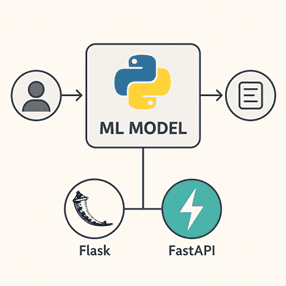
APIs (Application Programming Interfaces) act as bridges between your model and the outside world. They allow applications, websites, or other services to send input data to the model and receive predictions in real time.
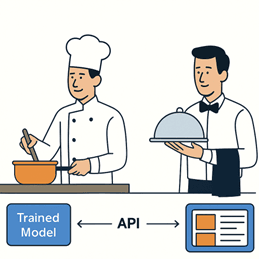
Analogy:
- Your trained model is like a chef in the kitchen.
- The API is the waiter taking orders and delivering dishes to customers.
Without an API:
- Applications cannot interact with your model efficiently.
- You cannot serve multiple users simultaneously.
- Real-time predictions are difficult or impossible.
Example Scenario:
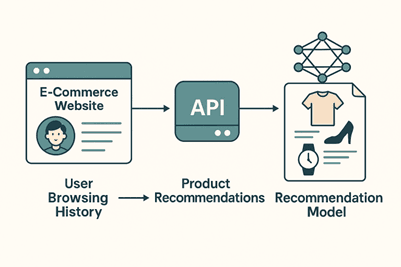
- An e-commerce website sends user browsing history to a recommendation model via an API.
- The API returns product recommendations instantly for display.
Flask is a lightweight Python framework perfect for creating REST APIs.
Steps to Create a Flask API:
1. Install Flask:
pip install flask
2. Create a Python script (app.py):
from flask import Flask, request, jsonify
import pickle
app = Flask(__name__)
# Load serialized model
with open("model.pkl", "rb") as f:
   model = pickle.load(f)
@app.route('/predict', methods=['POST'])
def predict():
   data = request.get_json()  # Get input JSON data
   prediction = model.predict([data['features']])
   return jsonify({'prediction': prediction.tolist()})
if __name__ == '__main__':
   app.run(debug=True)
3. Run the API:
python app.py
4. Test with a POST request:
POST /predict
{
 "features": [5.1, 3.5, 1.4, 0.2]
}
Advantages of Flask:
- Simple and easy to implement.
- Widely used with strong community support.
Limitations:
By default, synchronous; may not handle very high traffic efficiently.
FastAPI is designed for speed and scalability, supporting asynchronous requests and automatic documentation.
Example of FastAPI:
from fastapi import FastAPI
import pickle
from pydantic import BaseModel
app = FastAPI()
# Load model
with open("model.pkl", "rb") as f:
   model = pickle.load(f)
class InputData(BaseModel):
   features: list
@app.post("/predict")
def predict(data: InputData):
   prediction = model.predict([data.features])
   return {"prediction": prediction.tolist()}
Advantages:
- Asynchronous support improves scalability.
- Automatic API documentation at /docs.
- Data validation ensures input is correctly formatted.
Example Use Case:
A real-time fraud detection model that must handle thousands of transactions per second.

1. Input Validation: Ensure the API checks input data before passing it to the model.
2. Error Handling: Return meaningful error messages for invalid requests.
3. Logging: Track requests, predictions, and errors for debugging and monitoring.
4. Versioning: Use versioned endpoints (/v1/predict) to manage updates safely.
5. Security: Use authentication, HTTPS, and data encryption for sensitive models.
Example:
Returning a clear error message:
{
 "error": "Invalid input: feature vector must have 4 elements."
}
Before deployment:
- Test endpoints using Postman, curl, or Python requests.
- Simulate different types of inputs, including edge cases.
- Measure response time to ensure low latency.
Example Testing with Python:
import requests
url = "http://127.0.0.1:8000/predict"
data = {"features": [5.1, 3.5, 1.4, 0.2]}
response = requests.post(url, json=data)
print(response.json())
Testing ensures your API is reliable, fast, and ready for production.
Summary:
- APIs make your model accessible to applications and users.
- Flask is simple and easy for small-scale APIs.
- FastAPI offers high performance, asynchronous requests, and automatic documentation.
- Best practices include input validation, error handling, logging, versioning, and security.
- Testing your API thoroughly ensures smooth and reliable deployment.
Top Tutorials

Python
Python is a popular and versatile programming language used for a wide variety of tasks, including web development, data analysis, artificial intelligence, and more.
SQL
The SQL for Beginners Tutorial is a concise and easy-to-follow guide designed for individuals new to Structured Query Language (SQL). It covers the fundamentals of SQL, a powerful programming language used for managing relational databases. The tutorial introduces key concepts such as creating, retrieving, updating, and deleting data in a database using SQL queries.

Data Science
Learn Data Science for free with our data science tutorial. Explore essential skills, tools, and techniques to master Data Science and kickstart your career

 in Bengaluru, India


All Courses (6)
Master's Degree (2)
Fellowship (2)
Certifications (2)


 Preparing Your Model




 in Bengaluru, India