

Your Success, Our Mission!
6000+ Careers Transformed.
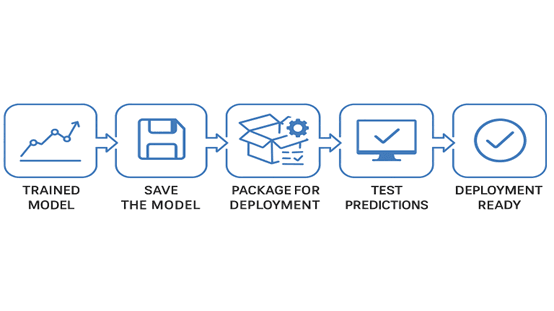
Before deploying a model, it must be carefully prepared to ensure reliability, efficiency, and compatibility. This chapter covers the steps required to get a trained model ready for production, including saving the model, handling dependencies, preprocessing inputs, and testing predictions. By the end of this chapter, you’ll know how to package your model and ensure it’s ready for serving to users or applications.
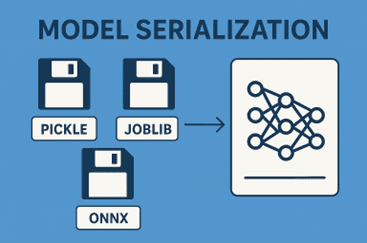
Model serialization is the process of saving your trained model to a file, so it can be reloaded later for predictions. Popular formats include:
Pickle: Simple Python serialization for most models.
Joblib: Efficient for large models with NumPy arrays.
ONNX: Open format to make models interoperable across frameworks.
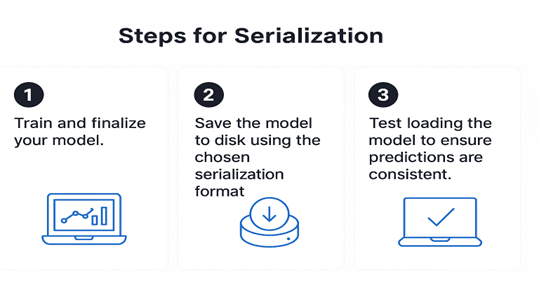
Steps for Serialization:
1. Train and finalize your model.
2. Save the model to disk using the chosen serialization format.
3. Test loading the model to ensure predictions are consistent.
Example:
import pickle
from sklearn.ensemble import RandomForestClassifier
# Train the model
model = RandomForestClassifier()
model.fit(X_train, y_train)
# Serialize the model
with open("model.pkl", "wb") as f:
   pickle.dump(model, f)
# Load the model
with open("model.pkl", "rb") as f:
   loaded_model = pickle.load(f)
# Test prediction
prediction = loaded_model.predict(X_test)
Key Points:
- Always test the serialized model to ensure predictions remain the same.
- Include all preprocessing steps as part of the serialized pipeline if necessary.
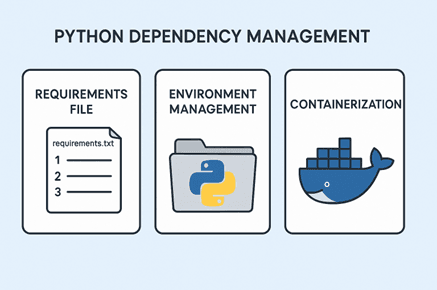
A model alone isn’t enough; it relies on Python packages, libraries, and system dependencies. Ensuring all dependencies are correctly managed prevents “works on my machine” issues.
Strategies:
Requirements File: Use requirements.txt to list Python packages.
Environment Management: Use virtual environments or Conda environments to isolate dependencies.
Containerization (Docker): Package the model along with dependencies into a portable container.
Example:
Creating a requirements.txt:
scikit-learn==1.2.0
pandas==2.0.1
numpy==1.24.0
flask==2.3.0
This ensures that anyone deploying the model can recreate the exact environment.
Models are sensitive to input format. In production, incoming data may not match training data format, so preprocessing steps must be consistent.
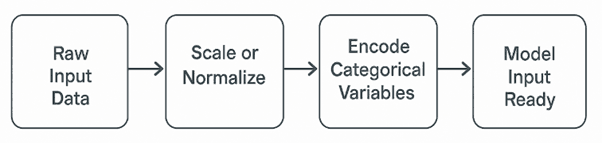
Key Steps:
Scale or normalize features using saved transformers (e.g., StandardScaler).
Encode categorical variables consistently (e.g., one-hot encoding).
Handle missing values gracefully.
Example:
import pandas as pd
from sklearn.preprocessing import StandardScaler
# Load saved scaler
scaler = StandardScaler()
scaler.fit(X_train)  # Assume fitted during training
# Incoming data
new_data = pd.DataFrame({"feature1":[5.2], "feature2":[3.8]})
# Preprocess before prediction
new_data_scaled = scaler.transform(new_data)
prediction = loaded_model.predict(new_data_scaled)
Ensuring consistent preprocessing is crucial to avoid prediction errors or performance degradation.
Before exposing a model to users, it’s essential to test it thoroughly to ensure reliability and consistency in real-world scenarios. Start by validating predictions across a variety of test inputs to confirm that the model performs as expected on both typical and unusual data. Next, simulate edge cases such as missing or invalid inputs to ensure your system handles them gracefully without crashing or producing misleading results. Additionally, measure inference speed to estimate latency and determine whether your model can deliver predictions fast enough for the intended use case—especially important for real-time applications.
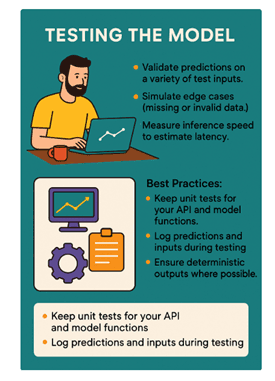
Best practices during this phase include maintaining unit tests for your API and model functions to quickly identify issues after updates, logging predictions and input data during testing to help analyze anomalies, and ensuring deterministic outputs where possible so that the model produces consistent results under identical conditions. This careful testing process ensures the model is robust, predictable, and ready for deployment in production environments.
Summary:
- Preparing a model for deployment requires serialization, dependency management, input preprocessing, and testing.
- Serialization ensures the model can be reused across environments.
- Proper dependency management prevents environment issues.
- Consistent preprocessing guarantees reliable predictions.
- Thorough testing ensures the model is ready for production and real-world use.
Top Tutorials

Python
Python is a popular and versatile programming language used for a wide variety of tasks, including web development, data analysis, artificial intelligence, and more.

SQL
The SQL for Beginners Tutorial is a concise and easy-to-follow guide designed for individuals new to Structured Query Language (SQL). It covers the fundamentals of SQL, a powerful programming language used for managing relational databases. The tutorial introduces key concepts such as creating, retrieving, updating, and deleting data in a database using SQL queries.

Data Science
Learn Data Science for free with our data science tutorial. Explore essential skills, tools, and techniques to master Data Science and kickstart your career

 in Bengaluru, India


All Courses (6)
Master's Degree (2)
Fellowship (2)
Certifications (2)


 Preparing Your Model




 in Bengaluru, India